HOW TO BUY DOGECOIN WITH A CREDIT CARD
Step by step instruction guide on buying Dogecoin with a credit/debit card on Edge Wallet app. You can buy other cryptos like Bitcoin and Ethereum by following the same steps.
Already have crypto? Continue to the PlayGames2026 depositDownload Edge Wallet App
Download Edge Wallet app from the Google Play store for Android or the App Store for iOS or use the link given above.
Create an Account in the Edge Wallet
- Open the Edge Wallet app.
- Follow the instructions to create your account.

Buy Crypto
Once the account is set up, select "Buy" on the home screen. Then select your country and select your region.
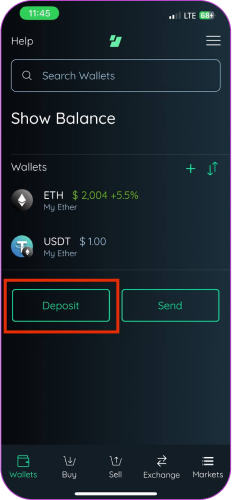
Follow the instructions
Select your country. Pick the method of payment. Choose the amount of crypto you want to purchase and follow the instructions to complete the buying process.

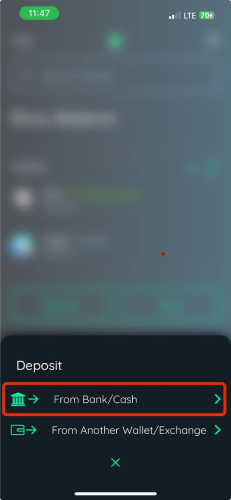
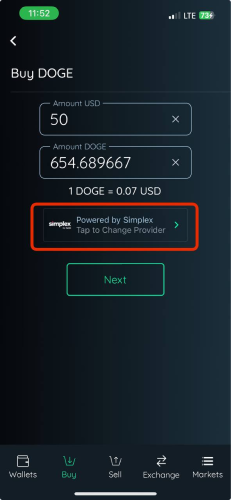
Verification Process
Some of the payment methods might require you to verify your identity. If that is the case, follow the instructions on the screen to verify your identity so you can process your purchase.
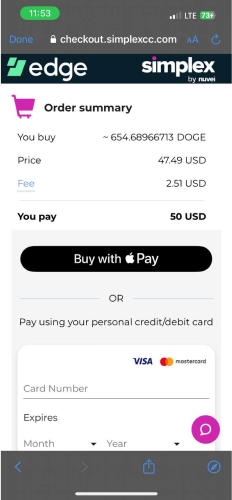
Review and Confirm
Review the transaction details such as the exchange rate, fees, and the total amount. Confirm your purchase to proceed with the transaction.
THE DOGECOIN YOU BOUGHT IS NOW STORED IN YOUR EDGE WALLET. ENJOY!
You are free to send the newly bought dogecoin wherever you want. Keep in mind that sending crypto from one wallet to another might incur a small transaction fee.
BUY ANY CRYPTO WITH A DEBIT OR CREDIT CARD ON UPHOLD
Buying with a card
Uphold and similar services let you buy crypto directly with a debit or credit card, which skips the bank transfer step.
- Card purchases usually cost more than funding by bank transfer. The convenience is real, and so is the spread.
- Some banks treat a crypto purchase as a cash advance or decline it outright. If a card fails, that is usually the reason.
- The name on the card has to match the name on the account. Mismatches are the most common cause of a frozen first purchase.
- Buy a little more than you plan to send, so the network fee does not leave you short of the amount you wanted.
Fees, limits and supported countries are set by the service and change over time — confirm them there before buying.
GO TO DEPOSIT